2007/10/31

Where is my UMPC, dude? Dude?? Aargh... Halloween ate my UMPC!

Where is my Everun?


Here for you some ways to have fun with your UMPC on Halloween...

Carve on your UMPC with stylus, save pumpkins...


Some carving designs to get you started.

And finally, the working prototype.

2007/10/15

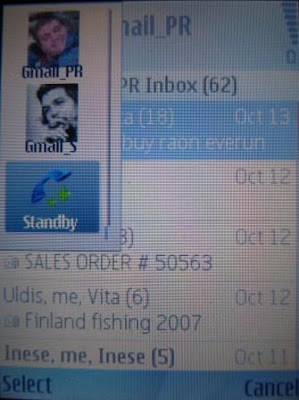
How to: run 2 mobile gmail apps on the same phone

Do You have more than one Gmail account and java enabled mobile phone (probably 99% of phones on the market now), and you would like to conveniently access both (or more) accounts without having to logoff/login between them all the time?

There is a simple way to do it, you can have several gmail clients installed on your phone, each configured with different mailbox name and password. On phones that allow more than one java program running at the same time (89% of them do...) you can even keep several mailboxes open.

The only problem that keeps you from doing so, is the fact that most phones will not let you to install more than one instance of any java app. To overcome this, we need to edit java midlet name. While at it, you can also customize application icon, for example, to coincide with your avatar for that mailbox.

Ok, first, we need to get the .jar file, which is the actual body of the program. If you go to gmail.com/app using non-mobile browser, you will not get a download link for your phone model. I used Firefox addon, called " User Agent Switcher" to create simple UA filled with "x" in each field. This tricks google into thinking that we connect from unknown mobile browser and giving us a download link for a generic java app (not optimized for your specific phone). If you want to find app exactly for your phone model, then you need to find your phone's precise UA string. (Google for it?)

Now, download .jad - the java declaration file, from given link.
Use Notepad to open .jad file. It contains path to .jar.

Now, download .jar file. Back it up. Unpack with RAR, 7Zip or any other program that works wth .rar files. Inside, find META-INF\MANIFEST.MF. Change midlet name - this allows to install several identic apps under different names. Then change text after mdlet-1: this will be the name that will appear under icon of installed app. And last, I changed icon to my avatar. For this, save your avatar as 32x32 or 64x64 .png file.

Now, it's time to put the changed manifest back into jar :). You can do it by opening original .jar and drag-n-drop new manifest overwriting the old one. If you changed icon, drop it in the .jar root, nearby or instead of GmailIcon.png.

Now, send your .jar to the phone, install, login, enjoy.

You can switch Firefox back to original UA profile.

2007/10/04

why I abandon ... part 1: PDAs

After 3 months of mourning for my ipaq hx4700, I have purchased an UMPC to replace it. With ipaq, I got used to long battery life (extended 5000 mAh), some 12-14 hours of heavy usage like browsing with WIFI. I also came to understand the limits of pocket pc and windows mobile software. The main drawback of any wm device is that even the most powerful of them, such as HTC Advantage, or my upgraded ipaq hx4700 with 128 mb of RAM, and even the upcoming ipaq 200 series, are not able to deliver FIE (as in Full Internet Experience). Sadly, it is not a hardware limitation, but a platform and software problem. Same devices would provide FIE under some flavour of mobile linux, like upcoming MID. But, MID are not on the market yet.


As to the rest of functionality that my pocket pc used to provide, it is all performed very well by my symbian s60 v3 smartphone NOKIA 6120 classic in a sleek 90g package.


There I have 5 mailboxes (hotmail, gmail), calendar, opera mobile that takes case of 90% of my browsing and RSS reading, bluetooth stereo music player and radio, and to rule them all - the magnificient FRING, that gives me mobile access to Skype, Gtalk, MSNmessenger, ICQ and twitter. I also have there a bunch of navigation programs like TomTom6, Nokia maps, gmaps, mgmaps, yandex maps, smartcomGPS. I also blog and photoblog on a phone. Even this article is written during my daily 10 km walk along Baltic beach. All of this is backed by unlimited internet package that costs only 30 euro per month.


I guess that 90% of my mobile computing needs are covered by smartphone. And those 10% left will not be done by windows mobile device despite its bigger screen or keyboard. That is, I say good bye to PDAs, you have been replaced by smart and miniature candybars.

Next, I will tell why umpc will replace a notebook too.

2007/09/09

WM6 for iPAQ hx4700

Custom WM6 ROM scene is flourishing, and thanks to several russian developers, most notably kozhura at 4pda.ru, this goodness have reached owners of ipaq hx4700. At this moment the ROM is too buggy, but if previous experience with WM5 AKU 3.5.2 is any indication of debugging speed, then we shall see a good quality ROM in 4-6 weeks time.

2007/09/08

HP iPAQ 200, the long needed successor to hx4700


The long awaited successor to hx4700 is on the horizon.


Judging its technical specs, it looks as a marginal improvement over it, not a revolutionary one. But it has a potential of making this the most powerful PDA ever. (And the last ever?)

  1. OS upgraded from WM5 to WM6. However, custom WM6 ROMs are already circulating at xda-developers (orginally made by kozhura @ 4pda.ru forums).
  2. Display is the same.
  3. SD slot will support SDHC.
  4. Physical d-pad is back. A definite improvement.
  5. Bluetooth is 2.0+EDR (3 times faster and, presumably, more energy efficient. The previous implementation of Bluetooth in hx4700 was all but efficient. Energy consumption tested by Menneisyys was a disaster, gobbling mAh even at idle rpms.
  6. WiFi g in addition to b. This means that watching VGA (DVD quality) movies from remote server over WIFI will be a smooth experience.
  7. More efficient VGA acceleration whatever this means.
  8. Increased RAM 128Mb (or not really increased? there is mixed information in HP PR materials, with 128 seeming a prevailing number). It would be a shame to not have 128MB in this PDA, as long and painful experience with hx4700 proved that 64MB is not enough for keeping several important applications (like navigation, browser, office programs, etc.) open at the same time and thus, quickly available at any second.
However, it is too early to state that the device will be more useful than its predecessor, before we get results of READ-WRITE benchmarks of production units. Hx4700 had a notoriously slow SD,CF slots and built in Flash read/write times, that were crippling its performance to a halt at times under WM5.


I would love to get my hands on this device for a more in-depth review.


Mobile month in Ukraine, with Nokia 6120 Classic

I am back from Ukraine, having spent 4 weeks there with nohting more than Nokia 6120 Classic. http://europe.nokia.com/A4399010

Strangely enough, all my plans previously outlined, have materialised.
I got a full month internet access from Life:) for just 60 Hrivnas (12$) per 1GB http://www.life.com.ua/index.php?area=lifebox&lng=uk&page=15-33

The best thing is that this deal is available also to the prepaid card users. As far as I know, it is the only Ukrainian operator giving such good prices to prepaid customers. Others give good price only to subscribed customers.

I have used phone to keep track of 5 mailboxes, Googlereading, photo blogging and GPS navigation (also internet based as in MGmaps and Yandex Maps). During 4 weeks I have used rougly 500Mb, so I think I have got a good deal there.


As promised, during this time Fring has issued a version 3.23 http://www.fring.com/ which now supports this handset. I have successfully used it on Life:) EDGE network. Some lag was there, but overall it was a bearable experience. Fring supports mobile VOIP over EDGE, 3G, WIFI networks on selected Nokia, Sony Ericcsson and Windows Mobile smart phones. Gtalk, ICQ, MSN, Twitter, Skype and SIP are currently supported.


Another surprise was cheap cost of mobile calls (1hrivna/minute to any country) as outlined here (Ukrainian)


Overall, I am very satisfied with the quality and costs of mobile communications in Ukraine.

2007/08/12

Mobile month in Ukraine

I am off to Ukraine for a month from Aug 12 to Sep 6th. I plan to get local GSM mobile number with the 1Gb data plan from LIFE and to keep blogging from my Nokia 6120 Classic to this blog (on the topic of issues facing a mobile blogger in Ukraine) and to my personal blog, letting my relatives see new pictures of relatives and nostalgic towns and villages as I travel.

During one month I will visit Kiev, Kherson, Zalizny Port (Metal Port?), Crimea (Simferopol, Evpatorija, Kazantip dance festival) and Odeassa region. Most of the time will be spent by the Black Sea. I really hope to come back as black as possible.

On the mobile side, I count that I will be regularly checking my 5 mailboxes, and keep working from far away on the development on of my web store (will use Quickoffice and OfficeSuite to open any attachment that come my way).

For browsing I will have Opera Mobile, Opera Mini 2 Russian mod, Opera 4 beta and Nokia S60 built in browser.

For IM and VOIP I will use IM+ (solnyshok (a) gmail.com, solnyshok (a) hotmail.com ) and IM+ for Skype. I do hope that during this month Fring will issue a version supporting Nokia 6120 Classic as they promised in their support forums. That would instantly enable my phone for Skype and Gtalk voice communications. I know that it would work reasonably well even over EDGE network that is currently the best you can get in Ukraine.

For Navigation I have Nokia Maps, Google Maps, MGMaps, TomTom6 and SmartComGPS. The problem is that none of the above have any good maps of Odessa, Kherson and Simferopol. For those, I just use maps from OzyExplorer converted for SmartComGPS. Those do not have street names though. For Kiev, I have quite good TomTom map (EasterEurope v608 beta). NokiaMaps and GMaps are pretty useless in Ukraine. Mgmaps (using MSN Roadmaps) are a bit better, but require constant data connection and do not have street names in the abovementioned southern Ukrainian cities.

I have studied mobile offers from UMS, Kyievstar, Beeline, and Life and came to conclusion that Life will suit me better, because I need not a prepaid, but a contract, and unlike others, Life allows me to use all of signup fee towards communications and data plan. Others just make signup fee (about 200 hrivnas) an entrance ticket. And the cost of data plan wih Life is 60 vs. 200+ with other operators. Of course, all of this is only my understanding, after studying operator websites, I will see if I am right in couple of days.

I am in Kiev Aug12-15, in Kherson Aug 16-18, Kazantip Aug 19-25, Odessa Auf 26-Sep6.

So, I am done with the last post on the proper keyboard for the next 4 weeks. Wish me luck, good weather, and stable network out there in Ukrainian prairies.

2007/07/18

Multiple Gmail apps on Nokia

The same .jar files that I prepared for Sony Ericsson couple of weeks ago, also works on my new Nokia 6120 Classic.

2007/07/12

RIP ipaq hx4700

My ipaq sank in bathtub during my recent trip to Stockholm couple of days ago. Even after drying it for the last 2 days, I could not reanimate it. Tought luck.

This iPaq hx4700 has properly served me for 2 years, going with me through upgrades from WM2003 onto WM5, it survived memory expanding surgery at PPCTECHs and came back with 128M RAM. Then thanks to Mamaich, I figured out how to increased pagepool and it became even faster than ever. And just a month ago, I upgraded it to excellent WM5 AkU3.5.2. It has seen GPRS, EDGE, UMTS and HSDPA connections, and I had to tweak its bluetooth speed limits to keep in line with faster mobile networks. It has been a great book reader for my trips to Turkey and Egypt. Its 8GB Compact Flash card has kept lots of cartoons and movies for my 3 kids who got accostumed to falling asleep holding it in their hands. With GPS and TomTom navigation software it is been a trusty guide to driving on the wrong side of the road in UK, and to driving through 2M wide city streets in Sicily. And I even used it for having a mobile Skype and Gtalk while driving around Riga, thanks to an unlimited HSDPA connection in his little brother, Nokia 6120.

Did I mention games? Skyforce, Warfare Inc, Bejewelled?

And last, but the most important, it has become my window on a world during last 2 years. I got so much used to reading from my palms, that even laptops and nice desktop computers could not compete with this experience.


R.I.P, old friend