2009/04/18

Shozu problem

I don't get why people like this program. I honestly try it once or twice a year, hoping to start using it. But I again find that it is useless for me. I have some photos (5mpx) that I want to reduce in size and upload to blogger service. But there are 2 show stoppers. 1 - it would resize only to some ugly qvga resolution. 2 - it would create a separate post for each photo. No go. I need to resize to VGA or 800*600 and send multiple pictures as single post. And if they could allow for additional extra - like creating an embedded slide show or collage from those photos - I would love them.
Unfortunately, the most important change in Shozu that I noted so far, is that now it correctly processes russian encoding. Deleted. Will try it again after 6 months.

2009/04/14

Try OpenSolaris without downloads and installation - online

I keep studying options for my new home server, and one of the ideas that intrigued me, is that people swear by OpenSolaris filesystem called ZFS. Went to OpenSolaris sandbox. I haven’t tried it yet, but I already like the note in bold at the bottom.

:)

image

Update: So, I tried it. On the surface is the same Gnome 2.24 as in many other Linux distributions. Seems that I need to go elsewhere to understand the benefits of ZFS.

image

Using Asus eeepc 1000h as home server

I want to replace my P4 2.8GHz home server (Power draw around 100+ W/h, no processor scaling) with something more efficient. The current king of the hill in terms of power efficiency while providing adequate performance seems to be Intel Atom processor. I already have a netbook based on single core Atom, and before jumping and taking a mini ITX motherboard based on Atom (good list here at kramfs.com) I decided to test how well it is doing its job in the netbook.

So, I connected eee 1000h to my router via ethernet cable. Unfortunately, 1000h has only 100Mbps NIC. I shared a movie folder with the network, and connected 4 computers, playing 2 HD videos (up to 2.5 MB/s each) and 2 DVD videos (up to 1MB/sec each).

20090413052

On the picture – eee pc 1000h as server. 2 laptops and home entertainment PC, and old server (not visible) are playing videos, trying the limits of eeepc. Didn’t succeed by the way. Here are proof pix.

Capture2

Network utilization seems low, peaking only at some 43% (or 6MB/sec). I used a 9GB movie for this test. Sure it would be different if I used a 20GB movie. But it also reflects the current state of torrent popularity in our country. Videos larger than 10GB are not here yet. I watched “The Matrix” in 20GB hi-def, but deleted it later.
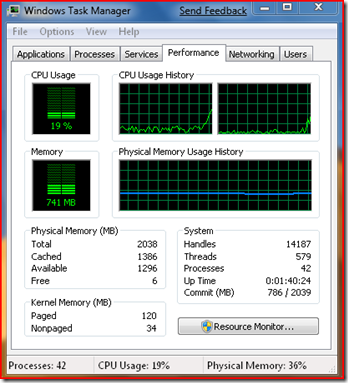
Capture

CPU usage averaged around 15-20% in the process. So, for my current usage patterns, it means that all my kids can watch their own movies on as many computers as I got in this house.

I am now on the crossroads, my two options are

1) take a new mobo based on DualCore Atom. It is around $100 here, and only $20 more expensive than single core Atom option. But it has Gigabit NIC, which is good for file transfers. Investment - 100$ mobo, $70 case with power supply, $30 2GB RAM stick. Total $200. The drawback here – I get another computer to care about.

2) use my 1000h as home server, as I do not have much use for it since I got a 12inch work laptop. I would need to buy a 500GB 2.5” SATA HD to make this a useful home server. My current server has 1TB 3.5” SATA and I could move it into my video/game machine. Investment - $120 for harddrive. Drawback – slow file copying on the network. Copying one file immediately fills the NIC with some 11 MB/sec transfer. My current transfer speeds are limited by harddrive writing speeds at 35-40MB/sec.

Decisions, decisions…

2009/03/27

RDP/ Thanx god it’s Friday.

image  

Web speeds have improved so much over last 2-3 years, that now it is so easy and convenient to RDP from work to home server, initiate download of Ubuntu 9.04 beta and even burn it to the disk that I loaded into DVD drive in the morning.

Life is good. :)

2009/03/26

What is best sync solution for Windows?

image

I am looking for a best Win program to sync my numerous laptops, media pc, and hopefully, my mobile, with selected folders on my 24-hrs file server running on Windows 7.

After googling and reading a bit, I identified

  • Unison, and DeltaCopy – as Windows GUI for the famous rsync. Should be simple and mature.
  • Folder share (MS Live Sync) – free solution from Microsoft. Should be pretty simple too.
  • Synplicity,  Sugarsync, Dropbox – other well established programs. These seems to provide online storage for files, and any reasonable amount (over 2 or 5 GB for different programs) will cost money. Since I already have own always-on server, I feel that I do not need their service.

So, I will be installing and trying Unison, DeltaCopy and Foldershare.

2009/03/25

Time to upgrade? Nokia N82 firmware v31

image

I have been using v20 for  a long time since it was easily unlocked. But my phone recently started to behave erratically, I could not start media gallery anymore. Camera was slow. Everything was slow and it rebooted by itself too often (couple of times a week). I also have 16GB MicroSDHC card and I knew that latest firmware touted better compatibility with large cards. So it was time to go with full format of the phone and the memory card and painfull reinstallation of all programs.

So, here we go. Backup of PIM. Copying of files from card to computer. (that was not easy, the card wouldn’t read in card readers anymore, but using the phone in USB mode, did it). Format the card. *#7370# for hard reset.

I used Nokia Software Updater, and it did it evil thing by upgrading me to v31 and loosing my regional languages in the process. There I was, having now choice between English and Hindu. Instead of Latvian and Russian. Luckily, this isn’t a rare problem. It happens often, because the phone is produced for one country, and has that country’s product code and regional languages are added before shipping only.

This is fixed by changing phones product code to correct region and doing NSU again. Luckily it is easy and free (with caveats about understanding the risks of messing with Nokia firmware using non-Nokia tools). I used guidelines for N95 product code change from thenokiablog and it worked for my N82 too.

Format the card. Hard reset. Format the card again. (just in case, you know).

Here I am now. The phone is much faster even with all the software installed.(I relate it to better support for the large cards). It eats less energy (true, as promised in firmware changelog). It is more stable. (true, not self-initiated reboots anymore). And yes, there are some problems with Opera Mini 4.2 as noted by other users(for me, it manifests in slow response when using My Opera sync). Because of the this, I hope that there is another firmware on the way.

It is not unlocked anymore. Huh. There is a way to do it (mapdrive method) discussed in great detail in many places on the web. But you need to have your own certificate to sign several programs required in the process and I do not have one. It seems that at this moment, our friends in China stopped creating such certificates. Boy, do I want to be in the line when there is a new place creating personal certificates.

2009/02/02

Boost GMA950 speed in netbooks

If you have one of popular netbooks like Asus eeePC, or Acer One or MSI Wind with Intel GMA950 built-in graphics, chances are you can improve its performance. Turns out Intel has decreased GMA950 frequency from 400MHz to 133MHz for netbooks, to cripple video performance, and separate them further from the expensive notebooks using the same GMA950. Now, there is a program called GMA950boost. It is discussed in MSI Wind forums, with users reporting some 20-30% boost in the framerates. Which means, that if a game wasn’t playable before (say 10 fps), it will not get much better (at 13 fps). Still it maybe a nice boost for someone struggling to get their favorite game to more playable fps and 720p video to play smoother. Unfortunately, this program is not free yet. So it is up to you to decide if you want to pay some 10$ for it.

2008/12/08

Adding torrents to utorrent WebUI via bookmarklet

Background
I have utorrent running on my home server (Vista Ultimate) 24hrs*7day a week and have a variety of methods for connecting to it.

1) Remote Desktop Connection - this microsoft client is available for Linux (Ubuntu 8.10 in my case), OS X (Leopard) and all sorts of Windows.
2) WebUI works from firefox (and I think IE7/8 too) on any platform
3) I also use utorrent mobile java program on my Nokia N82 to connect from anywhere via GPRS to manage bandwidth consumption (pause all, resume all) and specific torrents (pause, stop, resume, remove torrent (and data)).

Until now, I mostly used firefox to find a needed .torrent, download it to my desktop, go into my webui page in firefox and upload .torrent file manually. Now I found a new and a very comfortable bookmarklet, that uses javascript to inject webui command into all .torrent links on a webpage. 

To use it, create a bookmark with any name and fill its URL with the code from utorrent forums
You'll need to edit the code by changing to your host and port (e.g. "mydomain.dyndns.org:8080"). If you don't want to login each time, you can even add your login information (e.g. "username:password@mydomain.dyndns.org:8080").

Now, whenever you are on a webpage containing some .torrent links, click your bookmark, then click the .torrent link that you want. It will automatically (in 4 seconds) direct you to your webui where you will see new .torrent added to your list.


2008/11/05

Installed Windows 7 with new taskbar on Asus Eee 1000H

image

Today I bought a new Ebony Black Asus Eee PC 1000H. My specs – Atom 1.6Ghz, 80GB HDD, 2GB RAM. Installed latest developer build (6801) on it. It loads during same 40 seconds but works faster than the stock Xandros.